Say what you put where
Use a sentence such as “I put the travel documents in the study drawer.” Include the object, the room and the useful detail about the spot. You do not need to describe everything around it; include what you would need to find it again.
Avoid vague references such as “I put it over there”. Those words make sense while you are looking at the object, but they leave little useful information for later. A familiar name and a specific place make a better record.
Check what the app understood
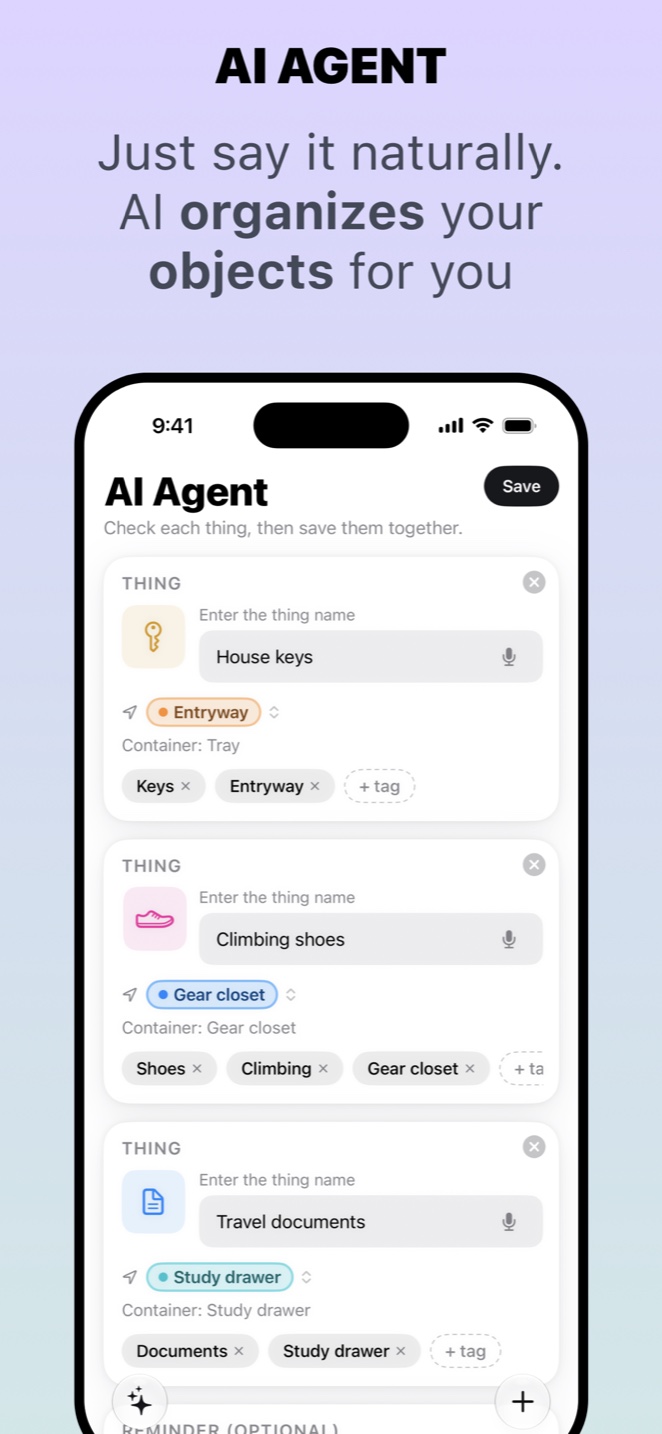
On supported devices, Whery’s AI-assisted flow can turn natural language into proposed item records. You can describe several things in one sentence, then check each result before saving. The screenshot shows separate records for house keys, climbing shoes and travel documents.
Review the item names and their assigned places. If two objects have similar names, add the detail you will need to distinguish them. If the app misunderstood a location, correct it before saving rather than relying on a sentence that only sounds right at first glance.
The AI processing runs on the device. Availability of AI-assisted features depends on the device and software; Whery also provides ways to enter information manually. Check the app’s current compatibility information rather than assuming every capture method is available everywhere.
Make it part of putting things away
Try the habit with one object today. Speak the location, check the result and save it before leaving the room. Later, search for the object using your own words to see whether the record gives you enough information.
When you move it, update the saved location. Voice input reduces the effort of making a record, but the information still depends on what you save. Whery does not listen to your home continuously or automatically know where someone else has put an object. A few deliberate seconds while tidying can create a useful reference for your next search.
Using Whery for this task
You can apply these steps to the records you save in the app. Check the name and location before relying on a search result.
Download Whery on the App StoreFree download, with limits in the free version and optional Premium purchases. Features depend on your device and software.