Identify the accessory before storing it
Start with an accessory you can still identify confidently. Note which device it belongs to, what makes it different and where you plan to keep it. “Camera charger” may be enough for one camera; with several, include the model or another reliable distinguishing detail.
For cables and adapters, record information you actually know. A photo can help recognise the object, but appearance alone does not establish electrical compatibility, charging power or data speed. Keep those details grounded in the product’s labelling or documentation.
Save a photo and a precise place
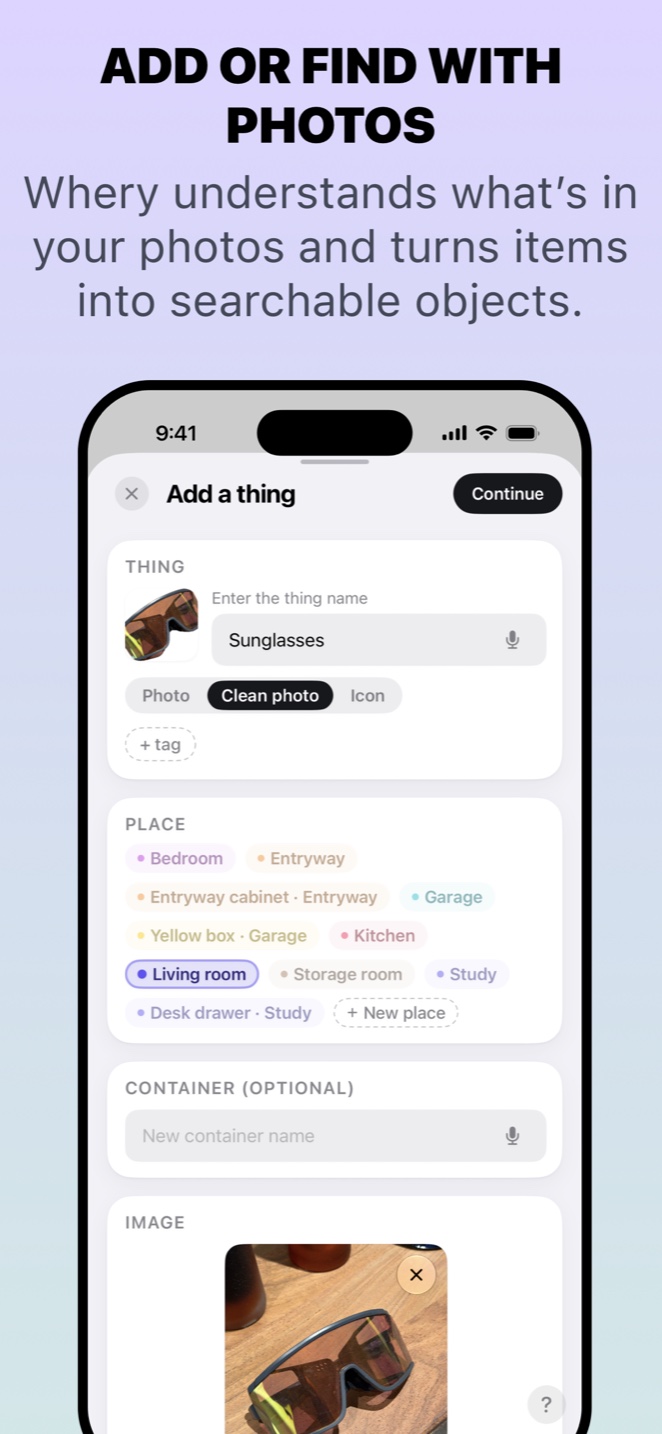
Whery supports adding an item from a photo. Use an image that makes the object easy to recognise, then check the suggested information and correct it if necessary. Add the room and the pouch, drawer or box you are using.
If you already have a bag for camera accessories, you do not need a new storage system. Record where each occasionally used item belongs within the arrangement you already understand. A photo of the accessory and a short location are often more useful than a long list of categories.
The screenshot shows the photo-based capture flow with sunglasses. The same approach can be used to record a small accessory you want to recognise later; the example is about the saving method, not automatic identification of every cable specification.
Check your record before buying another
When you need an adapter or spare accessory, search your saved items first. The record can remind you what you already stored and where to look. It only covers what you have recorded, so an empty search is not proof that you do not own something.
Update the location when an item moves from a drawer into a travel bag, or back again. Begin with a handful of accessories you often search for. You can build a useful record gradually, one object at a time.
Using Whery for this task
You can apply these steps to the records you save in the app. Check the name and location before relying on a search result.
Download Whery on the App StoreFree download, with limits in the free version and optional Premium purchases. Features depend on your device and software.